
AI: quick edits from flattened images
Describe the intended wording and preserve the parts of the image that already work.
WORKFLOW COMPARISON
Choose between conversational editing and direct layer control based on the source file, precision, and time available.
Edit image textUpload a JPG, PNG, or WebP. Describe the exact text change.
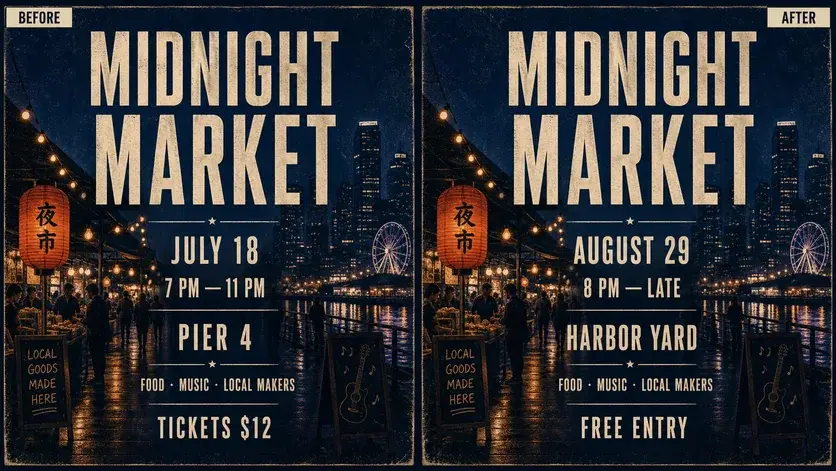
WHAT YOU CAN UPDATE
Use the finished image as context, make the requested copy change, then review the visual result before publishing.
Describe the intended wording and preserve the parts of the image that already work.
Describe the intended wording and preserve the parts of the image that already work.
Describe the intended wording and preserve the parts of the image that already work.
ABOUT THIS IMAGE EDIT
Vismuse is designed for outcome-based edits: upload a finished image and describe the change. Photoshop is designed for direct construction and control using selections, masks, layers, type tools, and manual retouching.
Use AI when the layered source is unavailable or speed matters. Use Photoshop when exact licensed fonts, pixel-level retouching, repeatable templates, or print-production control are essential.
Open the image text editorHOW IT WORKS
The editor uses your image and instruction as context. You stay in the conversation until the result is ready.
Start with a JPG, PNG, or WebP poster, photo, menu, screenshot, product visual, or AI-generated graphic.
Say exactly what to replace, remove, or add—and explain what should stay visually unchanged.
Check the result, ask for follow-up changes in the same chat, then download the version you approve.
Review before publishing. Photoshop is an Adobe trademark. PictureTextEditor is not affiliated with or endorsed by Adobe.
COMMON QUESTIONS
No. AI editing is instruction-based; Photoshop offers direct tools for layers, selections, masks, typography, and retouching.
AI may be faster when only a flattened image is available. The result still needs careful review.
Photoshop generally gives more deterministic control when you have the font, source file, and editing skills.
Yes. Use AI for a rapid visual draft and a traditional editor for production details that require exact control.
MAKE THE EDIT
Open the editor here, upload your visual, and describe the exact result you want.