
AI poster headlines
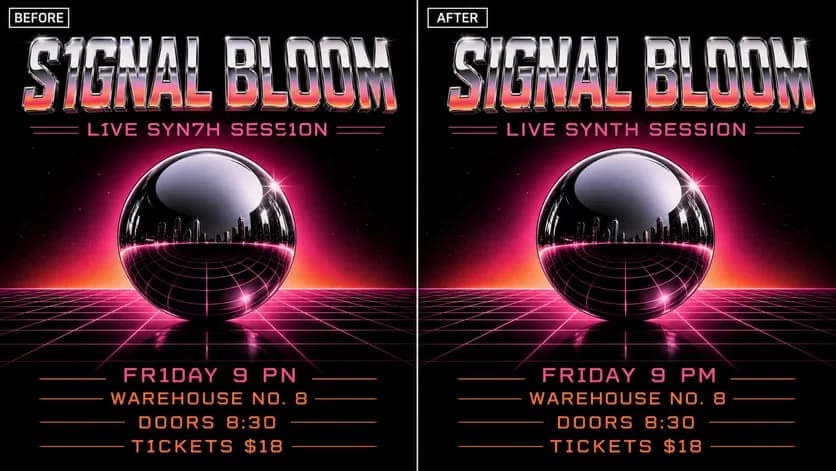
Describe the intended wording and preserve the parts of the image that already work.
AI TEXT CLEANUP
Correct misspellings, broken letters, and unreadable labels while keeping the generated artwork moving forward.
Edit image textUpload a JPG, PNG, or WebP. Describe the exact text change.
WHAT YOU CAN UPDATE
Use the finished image as context, make the requested copy change, then review the visual result before publishing.
Describe the intended wording and preserve the parts of the image that already work.
Describe the intended wording and preserve the parts of the image that already work.
Describe the intended wording and preserve the parts of the image that already work.
ABOUT THIS IMAGE EDIT
Image generators can create convincing artwork while missing letters, merging words, or inventing symbols. Use the finished image as context and describe the exact text that should appear.
Short, legible replacements tend to be easier to review. Zoom in and confirm names, spelling, punctuation, and repeated text before you publish.
Open the image text editorHOW IT WORKS
The editor uses your image and instruction as context. You stay in the conversation until the result is ready.
Start with a JPG, PNG, or WebP poster, photo, menu, screenshot, product visual, or AI-generated graphic.
Say exactly what to replace, remove, or add—and explain what should stay visually unchanged.
Check the result, ask for follow-up changes in the same chat, then download the version you approve.
Review before publishing. Keep the instruction specific: quote the replacement text and say what visual elements must remain unchanged.
COMMON QUESTIONS
It can replace many visible text areas when the target is clear. Results vary with tiny letters, blur, reflections, and complex textures.
Not always. If the artwork is already strong, a focused text edit can preserve more of the composition than starting again.
Quote the exact final wording, identify where it appears, and ask to retain the current placement, color, and visual style.
Check every letter, brand name, URL, number, and secondary text area at full size.
MAKE THE EDIT
Open the editor here, upload your visual, and describe the exact result you want.