
Events and concerts
Describe the intended wording and preserve the parts of the image that already work.
POSTER TEXT EDITOR
Refresh the message in a finished poster while using its existing composition as visual context.
Edit image textUpload a JPG, PNG, or WebP. Describe the exact text change.
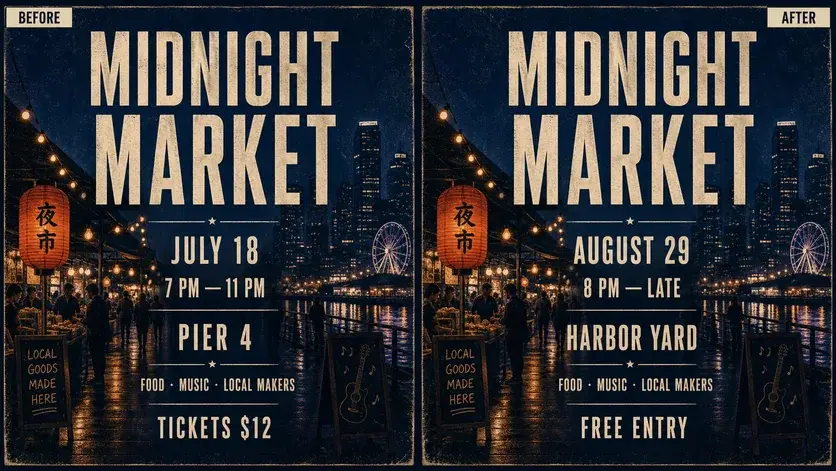
WHAT YOU CAN UPDATE
Use the finished image as context, make the requested copy change, then review the visual result before publishing.
Describe the intended wording and preserve the parts of the image that already work.
Describe the intended wording and preserve the parts of the image that already work.
Describe the intended wording and preserve the parts of the image that already work.
ABOUT THIS IMAGE EDIT
Posters often need one late change after the source file is gone: a new date, venue, performer, sponsor, or offer. Upload the flattened image and describe each replacement clearly.
Treat the output as a new visual draft. Check hierarchy, contrast, spelling, and whether the updated copy still fits the intended reading order.
Open the image text editorHOW IT WORKS
The editor uses your image and instruction as context. You stay in the conversation until the result is ready.
Start with a JPG, PNG, or WebP poster, photo, menu, screenshot, product visual, or AI-generated graphic.
Say exactly what to replace, remove, or add—and explain what should stay visually unchanged.
Check the result, ask for follow-up changes in the same chat, then download the version you approve.
Review before publishing. List several related copy changes in one clear instruction, then refine only the areas that still need attention.
COMMON QUESTIONS
Yes. You can start from a flattened JPG, PNG, or WebP and describe the text that needs replacing.
The existing poster supplies style context, but exact font matching is not guaranteed. Review the result at full size.
Yes. Use a simple list with the old and new wording for the date, venue, price, headline, or call to action.
Do not use the workflow to falsify official notices, credentials, records, or misleading evidence.
MAKE THE EDIT
Open the editor here, upload your visual, and describe the exact result you want.