
Spelling corrections
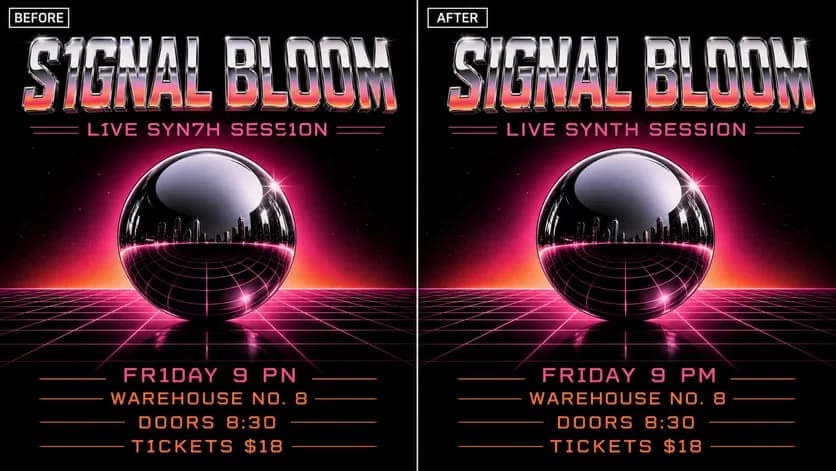
Describe the intended wording and preserve the parts of the image that already work.
IMAGE TYPO CORRECTION
Correct one embarrassing letter or punctuation mark while keeping the approved visual intact.
Edit image textUpload a JPG, PNG, or WebP. Describe the exact text change.
WHAT YOU CAN UPDATE
Use the finished image as context, make the requested copy change, then review the visual result before publishing.
Describe the intended wording and preserve the parts of the image that already work.
Describe the intended wording and preserve the parts of the image that already work.
Describe the intended wording and preserve the parts of the image that already work.
ABOUT THIS IMAGE EDIT
A single typo can block an otherwise finished campaign. Quote the misspelled and corrected versions so the editor has an unambiguous replacement.
Scan the entire result after editing. Similar words, small print, URLs, and repeated copy can hide additional errors.
Open the image text editorHOW IT WORKS
The editor uses your image and instruction as context. You stay in the conversation until the result is ready.
Start with a JPG, PNG, or WebP poster, photo, menu, screenshot, product visual, or AI-generated graphic.
Say exactly what to replace, remove, or add—and explain what should stay visually unchanged.
Check the result, ask for follow-up changes in the same chat, then download the version you approve.
Review before publishing. Compare the final image against approved source copy—not only against memory—before publishing.
COMMON QUESTIONS
Quote both versions in your prompt, identify the location, and ask to leave every other element unchanged.
Yes. Be explicit about apostrophes, dashes, commas, capitalization, or special characters.
The image provides style context, but exact matches vary. Inspect the baseline, weight, spacing, and texture.
Check names, URLs, dates, prices, repeated text, small print, and any text the AI may have redrawn.
MAKE THE EDIT
Open the editor here, upload your visual, and describe the exact result you want.