
iOS listing graphics
Describe the intended wording and preserve the parts of the image that already work.
APP STORE LOCALIZATION
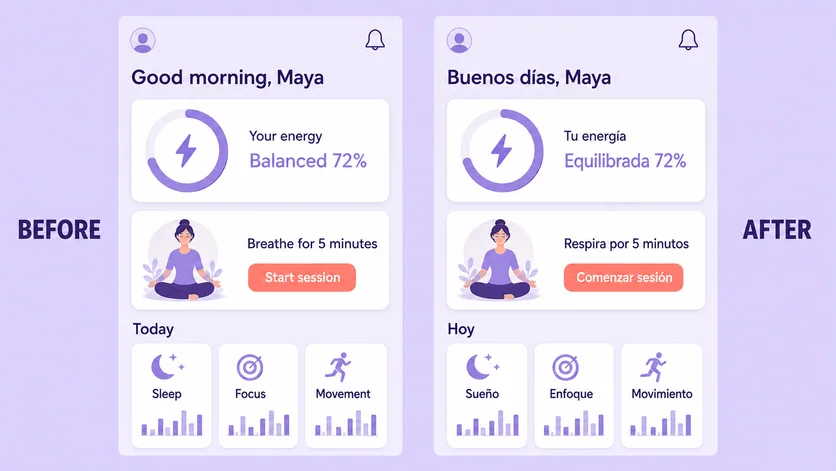
Create market-specific screenshot drafts while preserving product imagery, device frames, and campaign structure.
Edit image textUpload a JPG, PNG, or WebP. Describe the exact text change.
WHAT YOU CAN UPDATE
Use the finished image as context, make the requested copy change, then review the visual result before publishing.
Describe the intended wording and preserve the parts of the image that already work.
Describe the intended wording and preserve the parts of the image that already work.
Describe the intended wording and preserve the parts of the image that already work.
ABOUT THIS IMAGE EDIT
Store listings need more than translated strings: the visual must still scan quickly at thumbnail size. Provide approved copy for each panel and keep product UI separate from promotional text.
Check platform specifications, safe areas, localized screenshots, and current store policies before submission. Treat the result as creative production, not compliance approval.
Open the image text editorHOW IT WORKS
The editor uses your image and instruction as context. You stay in the conversation until the result is ready.
Start with a JPG, PNG, or WebP poster, photo, menu, screenshot, product visual, or AI-generated graphic.
Say exactly what to replace, remove, or add—and explain what should stay visually unchanged.
Check the result, ask for follow-up changes in the same chat, then download the version you approve.
Review before publishing. Verify current App Store and Google Play requirements independently before submitting any localized creative.
COMMON QUESTIONS
Yes. Provide the approved target-language headline and supporting copy for each screenshot panel.
Only if that screen represents the localized product. Keep promotional copy and in-app interface text clearly mapped.
Ask for a balanced reflow, then inspect safe areas, type size, and readability at actual listing scale.
No. Review current platform rules, dimensions, claims, and device requirements before submission.
MAKE THE EDIT
Open the editor here, upload your visual, and describe the exact result you want.