
Marketing graphics
Describe the intended wording and preserve the parts of the image that already work.
IMAGE TRANSLATION WORKFLOW
Turn a finished visual into a localized draft without manually recreating every text box.
Edit image textUpload a JPG, PNG, or WebP. Describe the exact text change.
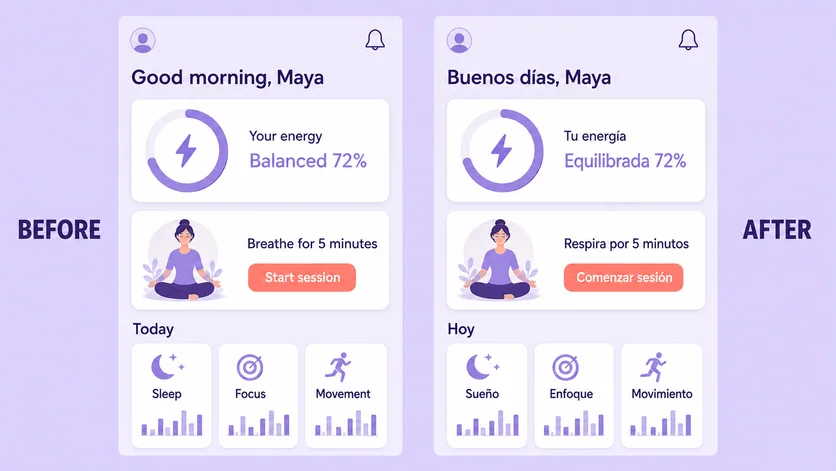
WHAT YOU CAN UPDATE
Use the finished image as context, make the requested copy change, then review the visual result before publishing.
Describe the intended wording and preserve the parts of the image that already work.
Describe the intended wording and preserve the parts of the image that already work.
Describe the intended wording and preserve the parts of the image that already work.
ABOUT THIS IMAGE EDIT
Image localization combines two tasks: accurate translation and visual fitting. Provide approved translated copy when wording matters, then ask the editor to place it in the corresponding regions.
Translated phrases may expand or contract. Review line breaks, clipping, cultural context, punctuation, and reading direction with a fluent speaker.
Open the image text editorHOW IT WORKS
The editor uses your image and instruction as context. You stay in the conversation until the result is ready.
Start with a JPG, PNG, or WebP poster, photo, menu, screenshot, product visual, or AI-generated graphic.
Say exactly what to replace, remove, or add—and explain what should stay visually unchanged.
Check the result, ask for follow-up changes in the same chat, then download the version you approve.
Review before publishing. For important content, supply human-approved translations and use the editor for visual placement rather than final linguistic approval.
COMMON QUESTIONS
Yes. Upload the image and either request a language or provide the exact approved translations for each visible phrase.
It can revise placement using the image as context, but you should check wrapping, clipping, and emphasis in every output.
No. A fluent reviewer should confirm meaning, tone, terminology, cultural fit, and legal wording.
Yes. A source-to-target list makes multi-area edits easier to inspect.
MAKE THE EDIT
Open the editor here, upload your visual, and describe the exact result you want.