
Signs and displays
Describe the intended wording and preserve the parts of the image that already work.
PHOTO TEXT REPLACEMENT
Point to the words already inside a photo, provide the replacement, and keep the rest of the scene visually coherent.
Edit image textUpload a JPG, PNG, or WebP. Describe the exact text change.
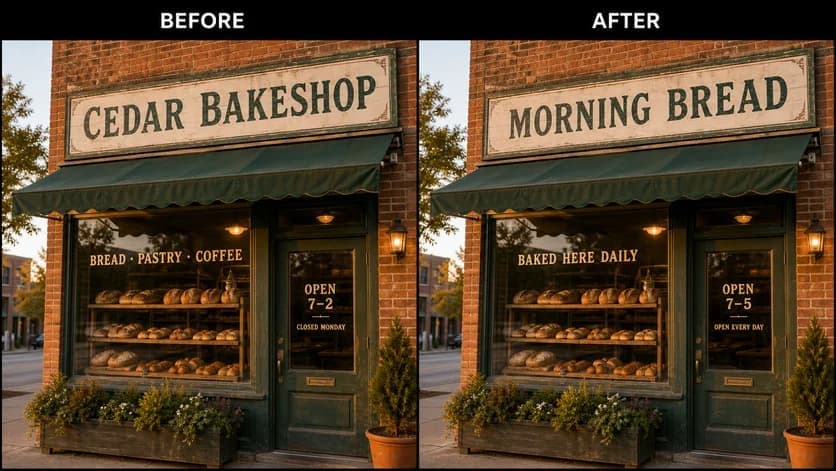
WHAT YOU CAN UPDATE
Use the finished image as context, make the requested copy change, then review the visual result before publishing.
Describe the intended wording and preserve the parts of the image that already work.
Describe the intended wording and preserve the parts of the image that already work.
Describe the intended wording and preserve the parts of the image that already work.
ABOUT THIS IMAGE EDIT
Text can be part of the photographed scene rather than a separate layer. Describe the sign, label, caption, or display you want to update and how the new wording should sit in the environment.
Perspective, reflections, blur, and occlusion affect the result. Review edges and letterforms closely, and use a higher-resolution original whenever possible.
Open the image text editorHOW IT WORKS
The editor uses your image and instruction as context. You stay in the conversation until the result is ready.
Start with a JPG, PNG, or WebP poster, photo, menu, screenshot, product visual, or AI-generated graphic.
Say exactly what to replace, remove, or add—and explain what should stay visually unchanged.
Check the result, ask for follow-up changes in the same chat, then download the version you approve.
Review before publishing. Vismuse may offer an initial way to try the workflow; current access and credit terms are shown in the editor.
COMMON QUESTIONS
Upload the photo, identify the text area, quote the new wording, and describe what should remain unchanged.
Access and credit terms can change. Open Vismuse to see the current trial or usage options before editing.
The photo provides that context, but results vary. Review slanted, reflective, curved, or partially hidden text carefully.
A clear JPG, PNG, or WebP at the highest practical resolution gives the editor more visual information.
MAKE THE EDIT
Open the editor here, upload your visual, and describe the exact result you want.