
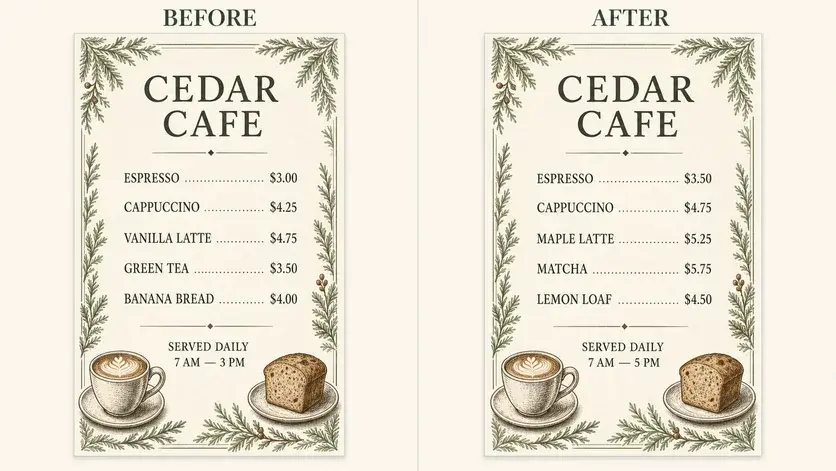
Dish names and prices
Describe the intended wording and preserve the parts of the image that already work.
MENU IMAGE TEXT EDITOR
Update a dish, price, description, or seasonal message when all you have is the finished menu image.
Edit image textUpload a JPG, PNG, or WebP. Describe the exact text change.
WHAT YOU CAN UPDATE
Use the finished image as context, make the requested copy change, then review the visual result before publishing.
Describe the intended wording and preserve the parts of the image that already work.
Describe the intended wording and preserve the parts of the image that already work.
Describe the intended wording and preserve the parts of the image that already work.
ABOUT THIS IMAGE EDIT
A menu image can become outdated after a price or item changes. A focused image text edit helps produce a revised creative without reconstructing the entire layout.
Food information has real consequences. Recheck prices, ingredients, allergens, dietary labels, taxes, and availability against your approved source.
Open the image text editorHOW IT WORKS
The editor uses your image and instruction as context. You stay in the conversation until the result is ready.
Start with a JPG, PNG, or WebP poster, photo, menu, screenshot, product visual, or AI-generated graphic.
Say exactly what to replace, remove, or add—and explain what should stay visually unchanged.
Check the result, ask for follow-up changes in the same chat, then download the version you approve.
Review before publishing. Always verify allergens, ingredients, and prices with the business before publishing the revised menu.
COMMON QUESTIONS
Yes. Quote the existing item and price, provide the replacement, and identify its position in the menu.
The image gives the editor visual context for typography and alignment, though exact font reproduction can vary.
Yes. Provide a structured list and review every line in the output, especially similar prices and repeated items.
Confirm prices, currency, tax language, ingredients, allergens, spelling, and availability.
MAKE THE EDIT
Open the editor here, upload your visual, and describe the exact result you want.